
MT5 EA · V6 cloud edition · no DLL
Jinge Tiema V6: setup, trial and licensing
Jinge Tiema V6 (金戈铁马 V6) is an Expert Advisor for MT5. Install a single EX5 file without a DLL and use strategy presets supplied through the cloud. Start with a 24-hour trial to check setup, connectivity and the panel before choosing a full license term.
- No DLLone EX5 file
- 26 presetssmart · classic · one-order
- 3 instrumentsgold · BTCUSD · EURUSD
- From 300 Uupdates included
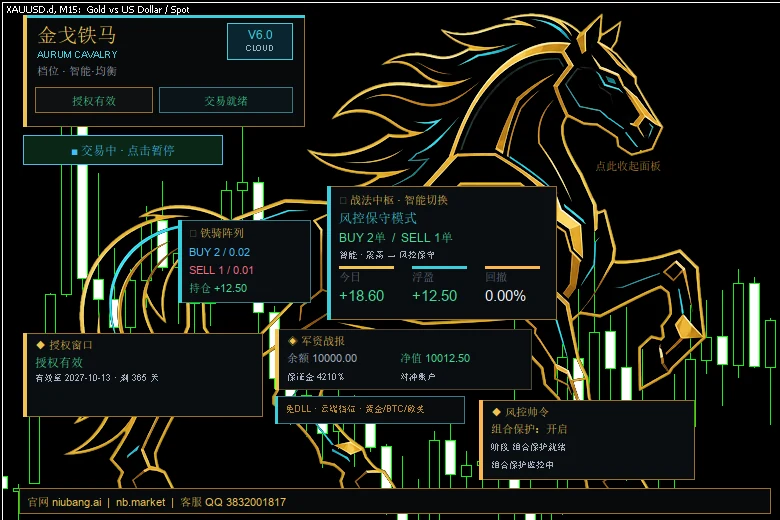
Check your setup first
Use a computer or VPS that can run desktop MT5, together with an MT5 account for testing. The terminal must remain online and be able to reach the licensing service while the EA is running.
V6 supports gold, BTCUSD and EURUSD instruments. Confirm the symbols available on your account, their contract specifications and the account mode before use. Presets that require simultaneous long and short positions need an MT5 hedging account; a matching symbol name alone does not establish compatibility with every preset.
The full version offers 26 cloud presets. Users select a preset and base lot size; detailed strategy parameters are configured through the cloud. Check the controls and workflow on a demo account first.
Try it free for 24 hours
The trial lets you check installation, activation and operation. Each MT5 account is eligible for one trial, on either a demo or live account.
- The 24 hours run from activation as elapsed time, including weekends and market closures.
- The trial preset is assigned through the cloud, with a fixed base lot size of 0.01.
- In the EA inputs, “测试风格” (trial style) can be set to “激进” (aggressive: V6's two-mode switching, recommended) or left at “保守” (conservative, the default).
- When the trial ends, the EA opens no new positions; existing positions are still managed through take-profit and closing.
- The trial does not automatically become a paid license. Contact support separately for a full-version quote and term.
Request a trial
Contact official support on QQ 3832001817 and ask for the “V6 trial.” Provide the account number for binding through the official private process, rather than in public comments.
3832001817Install and activate
Download the trial
Download the V6 trial EX5. In MT5, choose File → Open Data Folder, place it in
MQL5/Experts/, then refresh the Navigator.Allow the URL
In Tools → Options → Expert Advisors, allow WebRequest and add
https://xau.eaea.ai.https://xau.eaea.aiAttach the EA and paste the code
Attach the trial EA to the relevant instrument chart, allow algorithmic trading and activate the trial code in the panel's license window.
Check the status
Check the license, account and connection status. Activation starts the clock, so choose a time when you can observe the setup.
Full license and renewal
One window covers one MT5 account. Available terms and the price for your chosen term are confirmed by support.
| Item | Current license information |
|---|---|
| Account binding | One MT5 account per window; demo or live |
| Updates | New versions are included during the active license term |
| Account change | One MT5 account change per window during its active term, handled by support |
| Expiry reminders | The panel reminds you 7 days and 1 day before expiry |
| Renewal | Ask support to confirm the existing license, renewal term and quote; check the updated expiry afterward |
Before paying, confirm that the product is V6, the account binding is correct and the quoted license term is written down. Support verifies payment before processing a new license or renewal. This page does not automatically renew your license.
Purchase or renewal enquiries: QQ 3832001817. Include “V6 full license” or “V6 renewal” and the term you would like to discuss.
3832001817Install and update the full version
Download the EA
Download the full V6 EX5 and place it in
MQL5/Experts/within the MT5 data folder.Allow the URL
In Tools → Options → Expert Advisors, allow WebRequest access to
https://xau.eaea.ai.Attach the EA and choose a preset
Attach the EA to a chart, choose a strategy preset in the inputs and set the base lot size (about 0.01 lot per USD 10,000 of balance to start). When the EA runs on several charts of one account, give each chart a different magic number.
Activate
Enter the full-version activation code in the EA inputs, or paste it into the panel's license window and activate. Check the license status shown on the panel.
Updating later
On Windows, the full-version updater locates MT5 installations on the computer and updates the relevant files. Review which terminals need updating and choose an appropriate maintenance time. Use the trial updater for the trial version. Restart MT5 after updating; the activation code and preset stay as they are.
For setup help, send support your terminal version, steps taken and error message. Hide unrelated personal details in screenshots.
Common questions
What is Jinge Tiema V6?
An Expert Advisor for MT5 with support for gold, BTCUSD and EURUSD. It installs as a single EX5 file without a DLL; strategy presets are supplied through the cloud.
How much does V6 cost?
From 300 U per license window, payable in USDT; one window covers one MT5 account. Support on QQ 3832001817 confirms the term and its price.
Does V6 need a DLL?
No. It uses an EX5 file, but access to the licensing URL must still be allowed as described above.
Does 300 U cover a month or a year?
It is the current starting price, not a fixed monthly or annual rate. Ask support to specify the term in your quote before purchasing.
Can I try V6 before buying?
Yes. Each MT5 account can take one free 24-hour trial, counted as elapsed time from activation (weekends included). Ask support on QQ 3832001817 for a trial code.
Can I backtest the full version directly in the MT5 Strategy Tester?
The full version takes its preset parameters from the cloud, which the Strategy Tester cannot reach, so direct backtesting is not supported. Use the trial on a demo account to check the operating workflow.
How do I renew?
Ask support on QQ 3832001817 to confirm your existing license, the renewal term and the quote, then check the new expiry on the panel. The page does not renew automatically.
How do I update to a new version on Windows?
Run the updater for your edition (full or trial). It updates the V6 file in the MT5 installations on that computer. Restart MT5 afterwards; the activation code and preset stay as they are.
I already use V5. How do I upgrade?
Tell official support which version you have so they can confirm the applicable upgrade offer. This page does not automatically convert a V5 purchase into a V6 license.
What happens when a license expires?
The panel reminds you 7 days and 1 day before expiry. After expiry the EA opens no new positions; existing positions are still managed through take-profit and closing.
Which brokers are supported?
MT5 hedging accounts, which can hold long and short positions at the same time. One-order presets also work on netting accounts. Gold symbols with common suffixes (XAUUSD, XAUUSD.s, GOLD…), BTCUSD and EURUSD are recognised automatically.
Can I change the parameters?
You choose a preset and a base lot size. Parameters are delivered encrypted from the cloud and cannot be read from files on your computer or from network traffic. For a different style, switch presets or ask support to assign one.
Who do I contact for help?
Support on QQ 3832001817. Include your terminal version, the steps taken and the error message; hide unrelated personal details in screenshots.